To create a bootable USB stick, you need a USB stick with at least 8 GB capacity, an ISO or DVD image, and a specific tool (Rufus). Note: All data on the stick will be erased during the process.
Follow these steps:
- Download het ISO- of DVD-image naar je computer.
- Download het gereedschap (Rufus) naar je computer.
- Sluit de USB-stick aan.
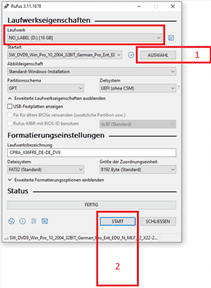
- Start the tool (Rufus) by double-clicking on the “rufus.exe” file – the tool will detect your USB stick.
- Click on “SELECT” and choose the ISO file (#1 on Screenshot 1).
- Click on “START” to initiate the process (#2 on Screenshot 1).
- Bevestig de waarschuwing over het overschrijven van de USB-stick.
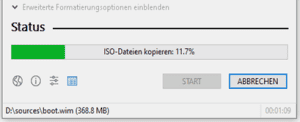
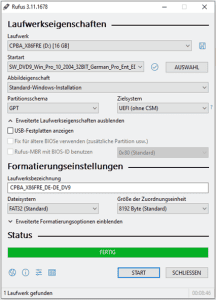
- Wait until the process is complete – marked with the message “FINISHED.”
- Close the tool by clicking “CLOSE.”